
Send every customer the email in their language, and everything else new in September
September 18, 2026
A German customer gets an order confirmation in English. A French B2B buyer gets a shipping update they have to run through a translator. If you sell in more than one language, you know the problem, and until now Shopify Flow had no good answer for it: you either built one workflow per language, with a branch for every locale, or you sent everybody the same email.
Workflow Transactional Email 1.14 fixes that. One email layout can now carry as many languages as you sell in, and your Flow step picks the right one for each customer automatically.
This post walks through how it works. Everything else that shipped across our four apps this month is further down.
How it works, in three steps
1. Add a language to your layout
Open any email layout and click Add language. The new language starts as a copy of your layout, with the same design, blocks and links, ready for you to translate the subject, preview text and content.
If you would rather not translate by hand, connect your own AI provider (Anthropic Claude, OpenAI, Google Gemini or OpenRouter) and choose Translate with AI. Every text is translated while your Liquid tags, links and design stay exactly as they are, and nothing is sent until you have reviewed and saved it.
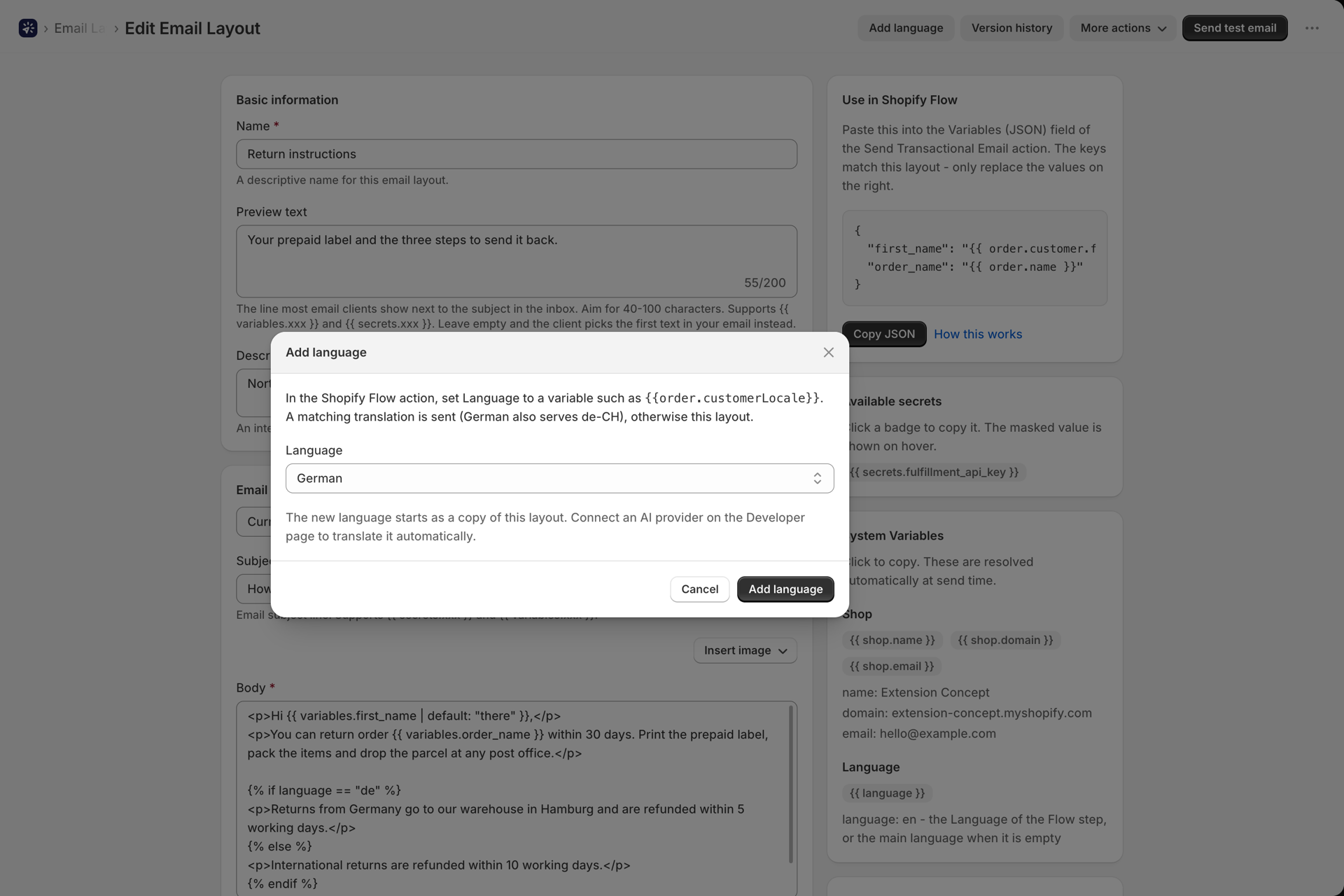
2. Tell Flow which language to send
In the Send Transactional Email step of your workflow there is a new Language field. Set it to the customer's language from the trigger:
| Trigger | Language |
|---|---|
| Order created, Order paid | {{order.customerLocale}} |
| Customer created | {{customer.locale}} |
| Fulfillment created | {{fulfillment.order.customerLocale}} |
One workflow, one step, every language.
3. We pick the closest match
Shopify often sends a region with the language, like de-CH or fr-CA. You do not need a translation for every region:
- An exact match wins:
fr-CAgets yourfr-catranslation. - Otherwise the base language:
de-CHgets yourdetranslation. - Otherwise a regional variant:
ptgets yourpt-brtranslation. - Otherwise the layout itself is sent, so nobody ever gets an empty email.
History shows which language every email went out in, and Send test email lets you test any language before it reaches a customer.
The full guide, with screenshots of every step: Send emails in your customer's language.
Also new in Workflow Transactional Email
Translations came with a set of features that make one layout do more:
- Order line items table. A new block lists the products of an order with images, quantities, prices and totals, and the Flow variables card writes the Flow loop for you. Guide
- Reply-To and From name per workflow, set straight in the Flow step, so replies land in your support inbox. Guide
- Attachments from a link. Attach an invoice or ticket PDF from a URL in your Flow data, fetched when the email is sent. Guide
- Version history. Every save is kept, so you can preview and restore an earlier version in one click. Connect GitHub for unlimited history. Guide
- Create and edit layouts with AI. Describe the email you want and get a layout you can edit in the builder. Guide
- We tell you when a sender stops working. If a Microsoft 365 or Google account disconnects, or an SMTP login stops working, the dashboard shows it and you get an email with the exact fix. Guide
- Emails arrive exactly as you built them, with their mobile layout, Google Fonts and Outlook styling intact, and Liquid that works the same when sent as in the preview.
- The visual builder uses the full page width and has desktop and mobile previews, plus undo and redo.
Workflow Trigger Extensions
Triggers for what shoppers do on your storefront
Every trigger used to start from something in your admin. Now a trigger can start from what a shopper does: viewing a product, adding to cart, searching, starting checkout, or searching for something you do not sell. Out-of-Stock Variant Viewed turns real shopper interest into a restock signal, and Checkout Error Shown tells you checkout is failing before a support ticket does. The app installs a web pixel for you, so there is no theme code to paste.
Shopper consent is respected, and these events are best effort and much higher volume than admin events, so switch on only the ones a workflow uses. Guide
Old and new values, everywhere
- Product, Order and Customer Update now tell you what changed, with the old and the new value of each field.
- Price and cost triggers come with the numbers: difference, percentage and direction, so "price dropped by more than 10%" is one Flow condition.
- Choose which changes fire an Update trigger. Every other update is skipped and does not count towards your plan, which is also the clean way to stop a workflow from triggering itself.
Custom triggers on a schedule
Flow cannot react when something does not happen. A custom trigger now can: run your code every 30 seconds up to once a day, with templates for not updated for N days, no orders for N hours, a value outside Shopify changed and a new item in an RSS feed. Guide
New: step-by-step tutorials and workflow templates
Every trigger group now has a step-by-step tutorial, starting with your first workflow, and there are ready-made workflow templates you can import into Flow, from redirecting old product URLs to tagging first-time customers.
Workflow Webhooks
- Run a workflow on a timer from any API. A new Schedule tab fetches a URL every 5 minutes up to once a day and sends the response into your webhook, on every fetch or only when it changed. Guide
- Signature verification for almost any sender. 22 built-in presets, up from 6, with a step-by-step guide for each one, such as Stripe or Typeform. Anything else is covered by a custom signature and a tester that shows exactly which step fails. Guide
- More ways to authenticate: Bearer token, Basic auth, a token in the URL, a second secret for rotation and an IP allowlist.
- Form and XML bodies, and split arrays into runs, so one request with a list of orders starts one workflow per order. Guide
Release notes: 2.9.0
Workflow Functions
- Connect your ERP or warehouse to Shopify. Call a function from your ERP with one HTTPS request and get the result back. 28 verified templates work by SKU: stock, products, price lists, orders and shipments.
- 85 templates in a new gallery, filtered by how they run: from your ERP, from Flow or on a schedule. Guide
- A new editor with a test bench beside your code, so you can run it before you save, plus version history for every function without GitHub.
Release notes: 2.0.0
All four apps got a new look. Each one was rebuilt on Shopify's current admin components, the same building blocks the Shopify admin itself uses, so pages load faster and behave like everything around them.
The four Workflow apps
If you are not running all of them, here is what each one does. More detail on Our apps.
Workflow Transactional Email - branded email and HTTP requests from Flow, on any Shopify plan, now in your customer's language. App Store - Documentation - Release notes
Workflow Trigger Extensions - 98 triggers Flow does not have natively, including your storefront, plus your own. App Store - Documentation - Release notes
Workflow Webhooks - trigger Flow from any external system or on a schedule, and send a reply back. App Store - Documentation - Release notes
Workflow Functions - run your own JavaScript or TypeScript from Flow, on a schedule or from your ERP. App Store - Documentation - Release notes
If something is not working, or there is a trigger or action you wish existed, write to [email protected]. It reaches us directly.