
Security for Shopify #2: two security checks in your admin, Shopify's 20 November deadline, and a critical NGINX flaw
This is issue #2 of our newsletter Security for Shopify, as it was sent to subscribers in November 2026. Get the next issue by email.
This is the second issue of Security for Shopify. October was the month of incidents. November is the month of consequences: Shopify turned its recommendations to app developers into rules with dates, and for the first time you can see in your own admin which of your apps follow them.
If you only have two minutes, read section 1 and the Black Friday checklist at the end.
1. Your admin now shows two security checks for every app
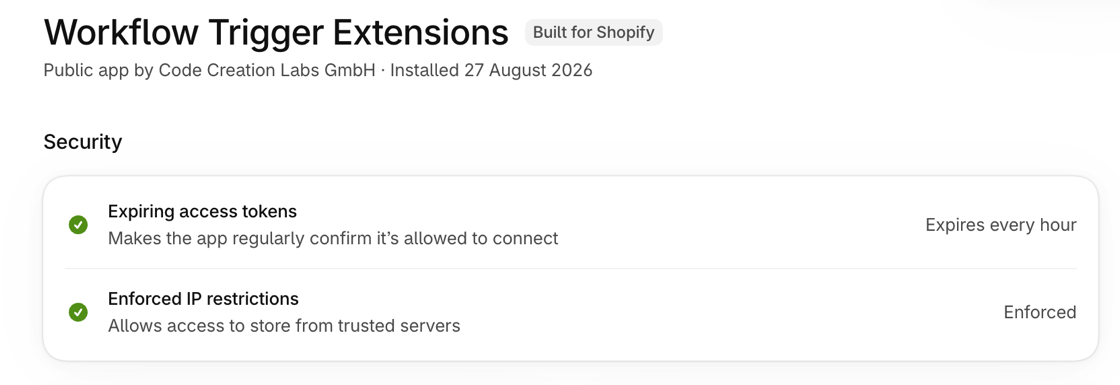
What happened. On 5 November Shopify added security information for every app to your admin. The list under Settings > Apps now shows when each app was last active and highlights security issues. Click an app and you find a Security section with two checks, each marked Configured, Missing or Unknown. A configured check can show its setting instead, for example "Expires every hour" or "Enforced":
- Expiring access tokens. The key the app holds to your store renews itself all the time. A stolen key stops working on its own.
- Enforced IP restrictions. The developer told Shopify which servers the app calls from, and Shopify refuses that app's key from anywhere else. A stolen key does not work from the attacker's machine.
This is what it looks like when both are in place, here for one of our own apps:
The same page lists permissions the app has not used for 30 days under "Unused access". Shopify's help page explains the view.
What it means for you. Until now you had to ask a developer and trust the answer. Now you can look. Shopify itself says the two checks are not an overall security rating: an app that passes both can still be badly built. But an app that misses one has skipped the two cheapest protections there are.
What to do.
- Open Settings > Apps this week. Start with the apps that can read customers and orders.
- An app with no recent activity is the easiest one to secure: uninstall it.
- For every check marked Missing, ask the developer for a date. The email further down is ready to copy.
- If you do not see the Security section, your staff account needs the permission to manage and install apps.
2. The dates behind it
What happened. On the same day Shopify made IP restrictions mandatory for every public app, "with the busiest weeks of the year for merchants almost here", as the announcement puts it.
- 12 November 2026: apps without them can no longer run bulk exports and bulk updates.
- 20 November 2026: apps without them are removed from the Shopify App Store, cannot be installed any more, and are flagged in your Settings > Apps.
- 1 January 2027: the same happens to apps whose access tokens never expire.
- 15 January 2027: Shopify warns merchants in the admin about apps that miss either requirement.
- 1 April 2027: those apps stop working. Until then, an app that is already installed keeps running.
New since 14 November. In a follow-up Shopify added three points:
- A removed app can come back. Shopify lists it again by itself as soon as its developer has added the IP restrictions.
- Custom apps count too. An app that an agency or a freelancer built only for your store needs IP restrictions as well: from 20 November for new installs, from 1 January 2027 for existing ones. Apps you created yourself in your own admin are not affected.
- Two-step login for every partner account. Agencies, freelancers and app developers reach your store through a Shopify partner account. Shopify announced that two-step login becomes mandatory for all of these accounts this week.
What it means for you. An app can disappear from the App Store on 20 November and still run in your store, with full access to your data, until April. A listing that is gone does not mean the app is gone. And if your store depends on an app that misses the date, you cannot reinstall it or add it to a second store until its developer has caught up.
What to do.
- Write down the three apps your store cannot run without, and check those first.
- If an agency or a freelancer built a custom app for your store, ask them now whether it has IP restrictions, and if not, by when.
3. The October app hijacks: where things stand
What happened since our first issue.
- The apps that confirmed incidents are available in the App Store again. Selleasy published a full incident report: the attacker got in through an old internal support tool, the redirects ran for a few hours on 13 October, and the app was re-listed on 27 October. Swym published a statement and an FAQ about a window of about two hours on 14 October.
- Nobody published numbers. Neither Shopify nor the vendors said how many stores or shoppers were affected.
- Shopify added link protection to every online store. Since 23 October your store blocks links to websites Shopify has identified as malicious and asks the shopper to confirm before leaving to a suspicious one. It is always on, and you can add domains you trust under Online Store > Preferences. Shopify's help page
What it means for you. If a shopper tells you they saw "This link has been blocked" or "Are you sure you want to leave?" in your store, treat it as an alarm, not as an annoyance. Something in your store tried to send them somewhere else.
What to do.
- If a shopper reports one of these messages, check the apps you installed or updated recently and the code in your theme. That is Shopify's own advice.
- If one of the affected apps was active in your store in mid-October, read the vendor's page: it gives the exact time window.
4. Updates that cannot wait
- NGINX, 18 November. Nothing you install yourself, but the most serious one this month for the servers behind your apps and tools. Section 7 has the details.
- Chrome, 9 November. Google released an emergency update for a flaw that is already being used in attacks (CVE-2026-125350). Edge and Opera are affected too. Restart the browser on every device you use for your Shopify admin, and check that it updated. Google's release note The regular update to Chrome 158 followed on 17 November with 204 more security fixes, so restart once more. Release note of 17 November
- Outlook, 10 November. Microsoft fixed an Outlook flaw that is already being exploited (CVE-2026-124194). Install this month's Windows and Office updates. Outlook is where fake Shopify emails arrive. Microsoft's advisory
- Node.js. The October flaw we wrote about (CVE-2026-111497) is now on the list of vulnerabilities known to be used in attacks that the US cybersecurity agency CISA keeps. A further security release for all supported versions followed on 11 November. The patched versions are 22.23.5, 24.22.3 and 26.13.1. You install nothing yourself, but a large share of Shopify apps run on Node.js, so it belongs in your question to developers.
- PHP, 19 November. For the second time within a month, PHP released security updates for all supported versions: 8.5.13, 8.4.28, 8.3.37 and 8.2.36. The flaw they fix (CVE-2026-115560) lets an attacker run code on the server, but only in apps that change PHP's session settings while they run. Many Shopify apps are written in PHP, and only their developers can tell whether they are affected. PHP's release notes
- Java, this week. Oracle released a fix for a flaw in Java itself (CVE-2026-114938, called Java4Shell), which its finders rate as critical. It concerns apps and middleware written in Java. BleepingComputer's report
- WordPress. Only if you run a WordPress blog or a WooCommerce shop next to Shopify: update to 7.1.4 or later. The flaw it fixes (CVE-2026-119977) is on CISA's list since 3 November. WordPress release note
5. Shopify is tightening who gets into the App Store
What happened. On 10 November Shopify changed the rules for new apps: developers must verify their identity before submitting a new app, a developer can only list another app once the existing ones have real installs, rejected apps wait longer before each new attempt, and apps that nobody installed for six months are removed. Since 12 November a developer can also take an app out of the App Store on their own. Such an app keeps running in your store until an end date at least 30 days later, and Shopify does not write to you about it: telling you is the developer's job.
What it means for you. Fewer throwaway apps and fewer anonymous developers. It does not make an app safe, but it removes the cheapest way to get a malicious one in front of you.
What to do. In the weeks around Black Friday, be careful with brand-new apps that have no reviews and promise a quick boost. If you want to try one, do it after the sale.
6. Almost a day without Microsoft email
What happened. On 12 November Microsoft's email service, Exchange Online, stopped answering for customers around the world. Outlook could not connect, and programs that send email through a Microsoft 365 mailbox got errors. Teams, SharePoint and Copilot were affected too. Microsoft tracks it as incidents EX1550543 and MO1550821. In a preliminary report of 16 November it names the cause: a fix rolled out to its network gateway servers since July had a hidden defect, and the servers stopped responding when more traffic was moved onto them while part of them was out of service. Microsoft counts 23 hours and 50 minutes, says there is no sign of an attack, and has announced a final report. Seen from our own systems, sending through Microsoft failed from about 17:00 UTC on 12 November until about 13:20 UTC on 13 November. Microsoft's service status, its status updates and a summary of the report
What it means for you. By Microsoft's account this was not an attack. It belongs here all the same: being available is one of the things security is there to protect, and a store that cannot send or read email has a problem whatever the cause. It showed in three places:
- Emails that an app sends through your own Microsoft 365 mailbox were late, or failed, depending on what that app does with an error.
- Your team could not read customer emails, password resets or anything else that arrives in that mailbox.
- Nobody could switch on the day. Moving email to another provider takes DNS changes, testing and hours you do not have during an outage.
What to do.
- Know which emails leave through which provider. Shopify's own notifications (order confirmation, shipping update) are sent by Shopify. Emails that apps send through your mailbox depend on that mailbox's provider.
- Keep a second way to send ready for the emails that must not wait: a second sender at another provider, for example an SMTP service or a Google account, set up and tested before you need it. You do not have to move. You only need somewhere to switch to.
- Ask your email apps one question: when the provider is down, is an email tried again or dropped? "Tried again for how long?" is the follow-up.
- Keep a way into your accounts that does not depend on your mailbox: an authenticator app or a security key for two-step login, and the recovery codes stored offline.
- Bookmark the status pages of what your store depends on: Microsoft, Google Workspace, Shopify.
- Do not click links in emails about an outage. Microsoft has warned of fake service notices that quote the real incident number of this one and claim that held emails are deleted within 24 hours unless you click. Look up the state of the service in your Microsoft 365 admin center instead. SecurityWeek's report
In our own apps. Workflow Transactional Email sends through your own mailbox, so stores with a Microsoft sender were affected: their emails were up to 20 hours late. None was lost. Shopify Flow tried them again until Microsoft answered, and we sent again what had failed in the first hours, when the app still recorded Microsoft's errors as final instead of trying again. That is corrected, the app showed a notice on its dashboard for as long as the outage lasted, and the stores concerned got an email from us at the start and at the end. If you want a fallback there, connect a second sender (SMTP or Google) in the app and switch the Flow step to it when your main provider is down.
7. NGINX: a critical flaw in the web server behind many apps
What happened. On 18 November the fixes for ten vulnerabilities in NGINX were released. NGINX is the web server and proxy that stands in front of a large share of all websites and app backends. Japan's IT security agency lists five of the flaws as critical, 9.2 out of 10. The two most serious ones (CVE-2026-123007 and CVE-2026-123633) sit in the way NGINX handles HTTP/2: according to Wiz, a security company that reported them, they let an attacker run code on the server without logging in. The fixed versions are NGINX 1.30.7 and 1.31.9. Wiz has not published its attack code, and as of 19 November we have seen no report of attacks using them. NGINX's advisories, Wiz's write-up and the alert of Japan's IPA (in Japanese)
NGINX is not alone. A week earlier, on 11 November, the Apache web server fixed a critical flaw in its own HTTP/2 code (CVE-2026-119618). The fixed version is 2.4.71. Apache's advisory
What it means for you. You do not patch Shopify: Shopify runs its own servers. What matters is everything around your store: the servers of the apps you installed, the tools of your agency or freelancer, a WordPress blog, a custom storefront, the middleware that syncs your orders or stock. If one of them runs an unpatched NGINX or Apache with HTTP/2 switched on, an attacker may be able to take over that server, and with it whatever access to your store that server holds.
What to do.
- If you, your agency or your freelancer run a server: update NGINX to 1.30.7 or 1.31.9 now, and Apache to 2.4.71. If that is not possible today, switch HTTP/2 off until it is. For NGINX that closes the two most serious flaws, not all ten.
- Products with NGINX inside (hosting panels, appliances, Kubernetes ingress controllers) need the update of their own vendor. The community project ingress-nginx was retired in March 2026 and gets no fix: whoever still runs it has to replace it.
- Ask the apps that can read your customers and orders. The email below has a fourth question for it.
In our own apps. All seven Workflow apps are served through Google Cloud's load balancer, not NGINX. One NGINX entry point was left in our platform, in front of an internal service: we switched HTTP/2 off there on 19 November, the day after the release, and we are retiring it. Two of the other flaws need HTTP/3 or the mail proxy, which were never in use there. Nothing to do on your side. The status is on our security page.
8. A card skimmer delivered through a testing tool
What happened. On 16 November attackers got into customer accounts of Optimizely Web Experimentation, a widely used tool for A/B tests on websites, and added their own JavaScript to those customers' projects. Every website that loaded such a project then ran the attackers' code. According to the researcher who analysed it, the code tried to read payment card details typed into the page, swapped cryptocurrency addresses and attacked iPhones. He found it in the scripts of 178 organisations, among them news sites, airlines and retailers. Optimizely says it closed the gap within three hours of noticing it, removed the code, and that less than 5 percent of its customers were affected. Optimizely's status page and BleepingComputer's report
What it means for you. It is the lesson of October again, from another direction: the websites did nothing wrong, a script they trusted did. Every outside script in your theme runs with the same rights as your own code. Shopify's checkout does not run the scripts of your theme, which protects the card fields there. Everything before the checkout is open to such a script: it can read what shoppers type in your store, change what they see, and send them to a fake checkout.
What to do.
- List the outside scripts in your store: in your theme code, in the app embeds of your theme (Online Store > Themes > Customize > App embeds) and under Settings > Customer events. Remove every one you no longer use.
- If you use Optimizely Web Experimentation, look for Optimizely's message: it says it contacted every customer of that product to confirm whether they were affected.
- On a custom or headless storefront, ask your developers which outside scripts load on pages with a login or a payment form, and whether a Content Security Policy limits them.
In our own apps. None of our apps uses Optimizely.
9. Three more changes in your Shopify admin
- A real activity log (13 November). Under Settings > General > Store activity log you now see who changed what, and when: products, orders, discounts, themes, apps, staff, payments and settings, each change with the staff member, collaborator or app behind it. It keeps up to 18 months instead of the last 250 events. It is open to the store owner and to staff with the Manage settings and Edit permissions permissions, and its history only starts shortly before the release. Open it once now, so that you know where to look when something seems wrong. Shopify's announcement
- Shopify Flow follows your staff permissions (28 October). A staff member can only test or turn on a workflow if they hold the admin permission for each of its steps, and access to Flow itself is set under Settings > Users > Roles (Flow automations). Workflows that are already on keep running. If a colleague suddenly cannot turn a workflow on, this is why. Shopify's announcement
- Custom apps you created in your admin (17 November) now appear in Shopify's Dev Dashboard. There you can limit which IP addresses may use the app's credentials, and you see the requests it makes. If you built an integration with such an app, switch that restriction on: its access token does not expire on its own. Shopify's announcement
An email for your app developers
Copy this, fill in the brackets and send it to every app with a check marked Missing, and to every app that can read your customers or orders.
Subject: [app name]: security checks in our Shopify admin
Hi [app developer / support team],
We use [app name] on our store [your-store.myshopify.com]. Our Shopify admin now shows two security checks for your app, and Shopify requires both: https://shopify.dev/changelog/app-security-updates-ip-allowlist-is-now-required
Could you confirm:
- IP restrictions: are they switched on and enforced for your app? Shopify requires them by 20 November 2026. If not, on which date?
- Expiring access tokens: does every install of your app already use them? Shopify requires them by 1 January 2027. If not, on which date?
- Security releases: are the October and November 2026 security releases of your runtime (for example Node.js, PHP or Java) installed?
- NGINX and Apache: if your service uses the NGINX or Apache web server, is it updated for this month's advisories (NGINX 1.30.7 or 1.31.9, Apache 2.4.71), or is HTTP/2 switched off until it is?
A short answer per point is enough. Thank you.
Kind regards, [Your name], [Store name]
Our own apps
Here is our own answer, for all seven Workflow apps:
- IP restrictions: switched on and enforced for every app. Our apps call Shopify from one fixed address.
- Expiring access tokens: every install uses tokens that expire after one hour.
- Security releases: installed. All seven apps, and the services behind them, have been running the Node.js release of 11 November (22.23.5, which includes the October fixes) in production since 14 November 2026.
- NGINX and Apache: all seven apps are served through Google Cloud's load balancer, not NGINX, and neither they nor the services behind them use Apache. On the one NGINX entry point left in our platform, in front of an internal service, HTTP/2 has been switched off since 19 November 2026, and we are retiring it.
Open one of our apps under Settings > Apps and you should see both checks with a green tick, as in the picture in section 1: "Expires every hour" and "Enforced". If you do not, write to support@codecreationlabs.com.
Five checks before Black Friday
- Expect fake Shopify emails. A payout on hold, a suspended store, a failed verification: the weeks around Black Friday are the season for them. Shopify says it never asks for sensitive information by email, and its real emails come from domains such as @shopify.com, @email.shopify.com and @em.shopify.com. Do not click. Open your admin yourself and look there, and forward the email to phishing@shopify.com. Shopify's guidance on phishing
- Two-step login for every staff account, and remove the accounts of people who no longer work with you. Seasonal helpers get their own account, never a shared one.
- No new apps and no theme changes during the sale week unless something is broken. Every change is a risk on the days you can least afford one.
- Test your checkout once a day during the sale, in a private window. The address bar must show your own domain or Shopify's checkout.
- Update every device you use for your store today: browser, Windows or macOS, phone.
Tell us what you want to read
Write to support@codecreationlabs.com with a question, an app you are unsure about, or something that looked wrong in your store. We read every reply, and the best questions become the next issue.
Stay safe, Yann Faulhaber Code Creation Labs